

This article is part of the HOGDigest editorial series. → Explore HOGDigest
Desks get more daily use than almost any other piece of office furniture, yet buyers often spend less time evaluating them than they do choosing seating or lighting. That's a mistake. An office workstation table shapes how employees work for eight or more hours a day, and the wrong choice shows up quickly in comfort complaints and cluttered layouts.
This guide covers the practical details that matter — materials, sizing, configuration options — so procurement teams and office managers can order with confidence instead of guesswork.
Why Workstation Choice Affects Daily Productivity
A desk isn't just a work surface. It affects posture, cable organization, storage access, and how easily a space adapts as team size changes. Poorly sized or poorly built workstations tend to generate small daily frictions — cords tangled underfoot, insufficient legroom, surfaces that scratch or warp within a year.
Choosing the right office workstation table from the start avoids a slow accumulation of these problems, which otherwise show up as complaints, workarounds, and eventually premature replacement.
Types of Office Workstation Tables
Single desks — Standalone units suited to private offices or spaced-out layouts where individual footprint matters more than shared efficiency.
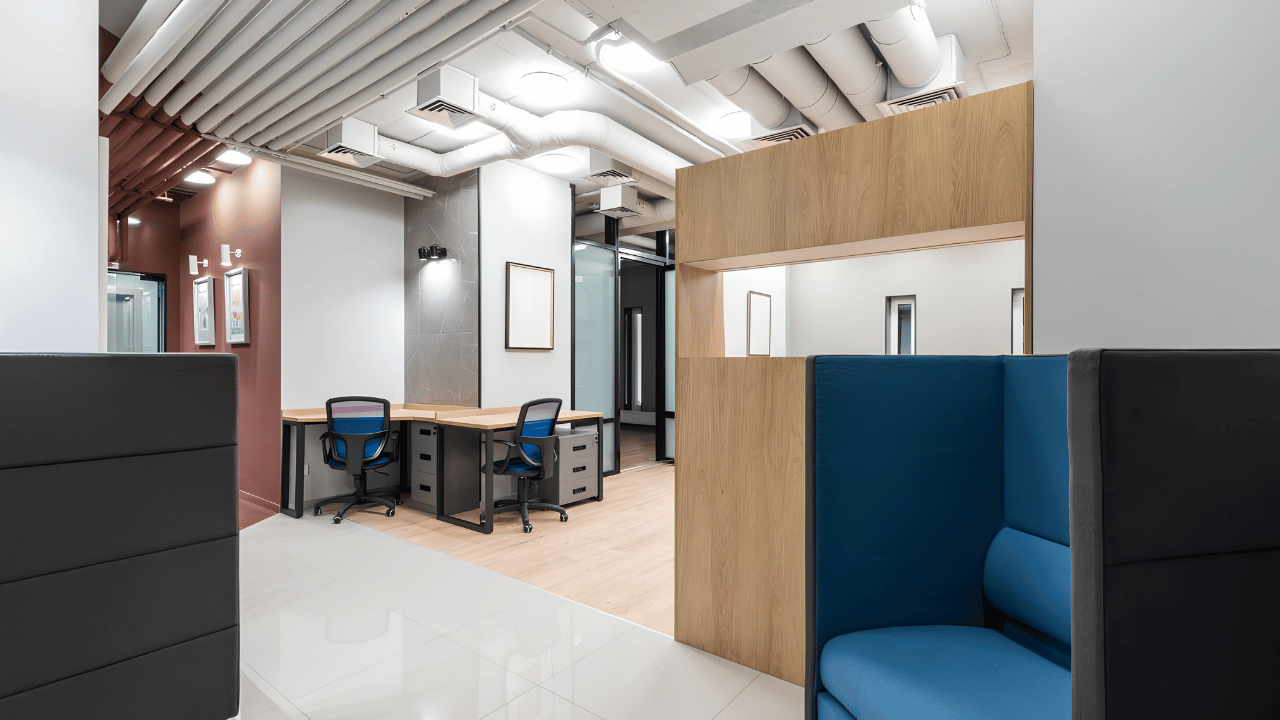
Benching systems — Multiple workstations connected in a row, sharing a frame and often cable management channels. Common in open-plan offices needing to maximize headcount per square foot.
L-shaped and corner desks — Provide additional surface area within a compact footprint, useful for roles needing dual monitor setups or reference materials spread across the desk.
Height-adjustable workstations — Sit-stand mechanisms built into the frame, increasingly requested for wellness-focused office designs.
Buying Guide: What to Check Before Ordering
Surface Material
Laminate surfaces resist scratches and moisture better than raw wood veneer, and they cost less to replace if damaged. Higher-end options use engineered wood cores with a durable top layer for a more premium look without sacrificing resilience.
Frame Strength
Steel frames handle weight and daily movement (adjusting height, shifting position) better than lighter aluminum alternatives, particularly for benching systems supporting multiple workstations at once.
Cable Management
Built-in cable trays and grommets prevent the tangled-cord problem that shows up almost immediately in workstations without this feature. It's worth confirming before ordering, since retrofitting cable management later is far more disruptive.
Sizing and Layout Fit
Measure available floor space and account for walkways, not just desk footprint. Benching systems in particular need clearance for chairs to be pulled out fully without blocking adjacent aisles.
Adjustability
Height-adjustable desks add cost but reduce complaints related to prolonged sitting, particularly in teams spending long hours at their workstation daily.
Benefits of Investing in Quality Workstations
- Reduces daily friction from cable clutter and poor surface durability
- Supports flexible office layouts as team size changes
- Improves employee comfort over long working hours
- Lowers long-term replacement costs compared to budget alternatives
- Reflects a more organized, professional workspace to visitors and clients
Common Mistakes to Avoid
Buyers sometimes choose desk dimensions based on floor plan software alone, without accounting for real-world clearance once chairs, storage units, and walking paths are added. This leads to cramped layouts that look fine on paper but feel tight in practice.
Another common issue: skipping cable management in an effort to reduce cost, only to face ongoing complaints and DIY fixes once desks are in daily use. Underestimating lead times for custom benching configurations is also frequent, especially when specific finishes or sizes are required.
Expert Tips
Confirm frame weight capacity before ordering height-adjustable desks, especially for setups with multiple monitors or heavier equipment. When comparing benching systems, ask specifically about cable tray capacity, since undersized trays fill up quickly once power strips and multiple device cables are added. And measure actual walkway clearance on-site rather than relying solely on floor plan drawings, which often underestimate how tight a space feels once furniture and people are both present.
Sourcing Custom Workplace Furniture
Standard sizing doesn't always fit irregular office layouts or specific team needs. Working with a provider of custom workplace furniture allows dimensions, finishes, and configurations to be adjusted to match a space exactly, rather than forcing a layout around off-the-shelf sizing.
This matters particularly for benching systems, where even small sizing mismatches across a row of connected desks can create uneven surfaces or awkward gaps.
Why Choose Mige Furniture
Sourcing an office workstation table at scale requires more than picking a size from a catalog. Mige Furniture works directly with procurement teams, architects, and office managers to align workstation specifications with real space constraints and team requirements.
As a provider of custom workplace furniture, the range extends beyond standard sizing to accommodate irregular floor plans, specific cable management needs, and finish preferences across multi-location projects — reducing the coordination challenges that come with sourcing standard furniture for non-standard spaces.
FAQs
What size should an office workstation table be? Standard single desks typically range from 120cm to 160cm in width, though benching systems and layout constraints often determine the final dimensions needed.
Are height-adjustable desks worth the extra cost? For teams spending long hours seated, height-adjustable desks can reduce discomfort and support better posture, often justifying the added expense over time.
What's the difference between a workstation table and a standard desk? Workstation tables are typically designed for open-plan or benching configurations, with integrated cable management and frame systems suited to multi-user layouts.
How long does a commercial office workstation table typically last? With durable materials and moderate daily use, a well-built workstation table generally lasts 10–15 years before replacement becomes necessary.
Can workstation tables be customized for irregular office layouts? Yes, many providers of custom workplace furniture offer configurable dimensions and finishes suited to non-standard floor plans.
What cable management features should I look for? Built-in cable trays, grommets, and power module integration prevent cord clutter and simplify daily desk use.
How far in advance should bulk workstation orders be placed? Custom configurations or large bulk orders often need several additional weeks of lead time beyond standard in-stock items.
Conclusion
Choosing the right office workstation table affects daily comfort, layout flexibility, and long-term furniture costs more than most buyers initially expect. Paying attention to surface material, frame strength, and cable management upfront helps avoid the small frictions that accumulate once desks are in daily use across a growing team.